Part 1: Online course
Part 1 is an online course made of modules. Each module has a video, a quiz, or both. Complete every module to earn your Part 1 certificate.
Start the course
- On the portal home, click Take the course in the Data Quality Program card.
- Review the course outline, then click Start Part 1.
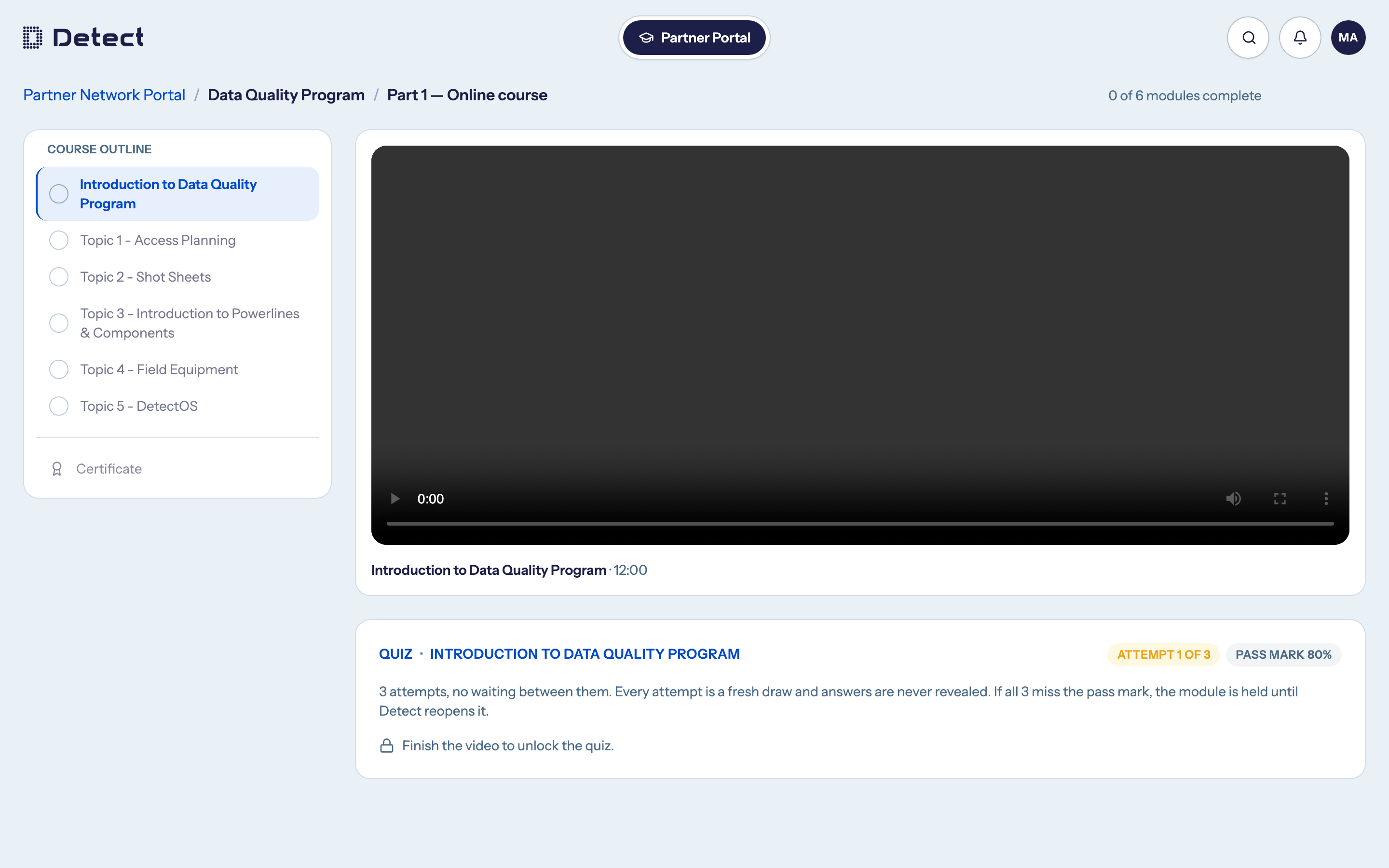
How the course works
- Modules open in order. A module opens once every module before it is complete. Finished modules stay open, so you can rewatch them at any time.
- You pick up where you left off. The course reopens at your current module.
- A module is complete when you have watched its video to the end and passed its quiz.
The Course outline on the left shows each module's state:
| State | Meaning |
|---|---|
| Check mark | Complete. |
| Empty ring | Not started yet. |
| Lock, "on hold" | You used every quiz attempt without passing. See If a module goes on hold. |
| Greyed out | Not available yet. Finish the module before it first. |
Videos
Videos play in your browser. You can change the playback speed. Downloading and recording course videos is not allowed under the course terms. A video counts as watched when you reach its closing seconds.
Take a quiz
The quiz unlocks when you finish the module's video.
- Click Start the quiz.
- Answer every question.
- Click Check answers.
The quiz header shows your attempt number and the pass mark, for example Attempt 1 of 3 and Pass mark 80%. Your course may use different numbers.
Things to know:
- Every attempt is different. Questions are drawn fresh from the module's pool and the answers are shuffled.
- Correct answers are never shown, whether you pass or fail. If you fail, go back over the module before trying again.
- Reloading the page resumes the same attempt. It doesn't give you a new one, and an attempt counts as used once you start it.
- Your course may set a waiting time between attempts. If so, the quiz tells you when the next attempt opens.
- Assessments must be your own work. Sharing questions or answers is against the program terms.
If a module goes on hold
If you use every attempt without reaching the pass mark, the module goes on hold. This keeps the question pool from running dry.
- You can still rewatch that module and any earlier modules.
- Modules after it stay locked until it is reopened.
- Only Detect can reopen it. Ask your Detect contact. Once someone has walked you back through the material, they restore your full set of attempts.
Your organization's admins cannot reopen a module, and the team roster does not show that a module is on hold, so contact Detect directly.
Your Part 1 certificate
When you complete every module, your certificate is issued automatically.
- Click View your certificate, or select Certificate in the course outline.
- Download PDF saves a copy.
- Email it sends the PDF to your inbox.
Each certificate has a unique ID, such as DQP1-2026-00042, and is personal to
you. From the certificate page, click Begin Part 2 to move on.